
Mastering XR Game Development in Godot: Lessons from Building "Assemble!"
Was die Godot-Produktion eines XR-Spiels wirklich lehrt — von Physik über Performance bis zur Horizon-Store-Review. Mit korrigierten APIs und dem Stand von Godot 4.6.

As CTO of weltfern, I led the development of Assemble! — an XR puzzle game built with Godot 4, now on the Meta Horizon Store. This post collects the lessons learned: why Godot, how to hit performance targets on Quest hardware, and what store submission really costs. The technical details are updated to Godot 4.6 — the original version contained a few API errors that are now corrected.
From Unity to Godot: why switch?
Unity would have been the easier route — but its closed-source model and the community exodus after the runtime fee debate under John Riccitiello made Godot the clear choice. After intensive production on Assemble!, I stand by the verdict: Godot is fit for professional XR development. What convinced us:
- Jolt Physics integration for realistic interactions — now even in web exports
- A dynamic GLTF loading system with adaptive difficulty
- Custom XR interaction systems built on Godot XR Tools (open source)
Personal experience: more than a technical guide
Before the details, an honest note: Assemble! pushed me out of my comfort zone repeatedly — from grappling with Godot's XR paradigms to performance bottlenecks that only appeared on the device. Those hurdles weren't mere bug lists; they were the project's real learning curve.
Godot XR: the evolution since 2024
The Godot editor on the Horizon Store
Since December 2024, the Godot editor runs natively on the Horizon Store — XR workflows entirely on the headset:
- Run your game in XR directly on the Quest headset (Quest 3 and up — the editor doesn't technically work on Quest 2)
- Test shaders and shading on the real device
- Performance validation without a PC detour
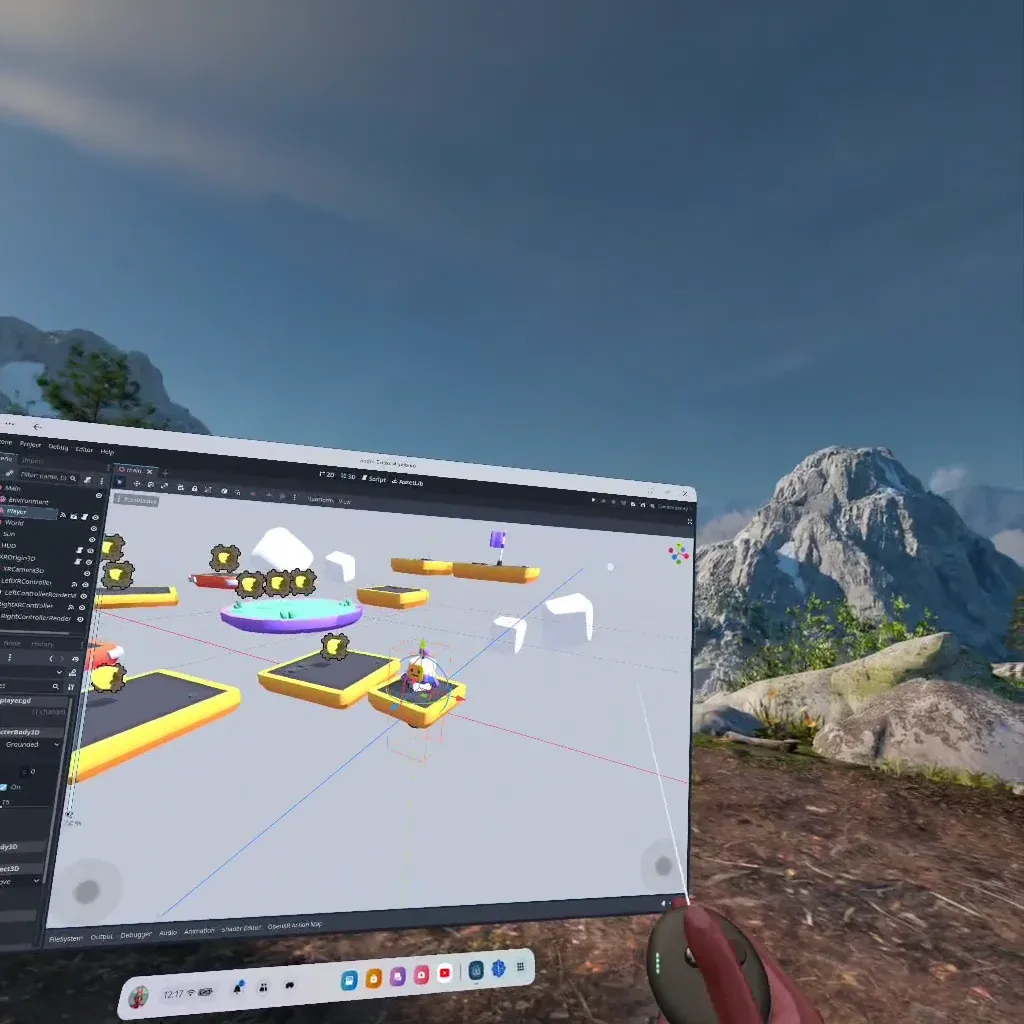
For Assemble!, the store version arrived too late — we started before it existed and worked on Quest 2 until the very end. Today I'd iterate on the headset from day one.
XR Tools and comfort standards
The XR Tools framework implements the best practices from the XR Design Handbook — teleport locomotion, snap turns, movement vignette, static reference points. Comfort options in XR Tools are configured via nodes in the player rig (movement-turn with snap mode, vignette strength and more), not through a single API call.
The initialization looks like this at its core (pattern from the official "Better XR Start Script"):
var xr_interface := XRServer.find_interface("OpenXR") as OpenXRInterface
if xr_interface and xr_interface.is_initialized():
    DisplayServer.window_set_vsync_mode(DisplayServer.VSYNC_DISABLED)
    get_viewport().use_xr = true
    # Set target refresh rate on the headset (Quest: 72/80/90 Hz)
    if 90.0 in xr_interface.get_available_display_refresh_rates():
        xr_interface.display_refresh_rate = 90.0
Performance: lessons from the trenches
Asset discipline
- Keep polygon counts under ~100k per scene
- Textures at 2048×2048 maximum
- Disable glow/postprocessing in VR — it eats the budget on mobile hardware
Monitoring — with the right monitors
A note of honesty: the original version of this post named Performance.TIME_FPS as the "GPU time" — wrong; that monitor returns the frame rate, not milliseconds. Godot doesn't expose a true GPU-time monitor; on Quest you measure it with the OVR Metrics overlay (see below). What works correctly in Godot 4:
func _process(_delta):
    var fps := Performance.get_monitor(Performance.TIME_FPS)
    var cpu_ms := Performance.get_monitor(Performance.TIME_PROCESS) * 1000.0
    var draws := Performance.get_monitor(Performance.RENDER_TOTAL_DRAW_CALLS_IN_FRAME)
    var tris := Performance.get_monitor(Performance.RENDER_TOTAL_PRIMITIVES_IN_FRAME)
    if cpu_ms > 11.0 or fps < 72.0:
        $OptimizationAlert.trigger()
| Metric | Godot 4 monitor | Quest target |
|---|---|---|
| Frame rate | Performance.TIME_FPS | ≥ 72/90 FPS |
| CPU frame time | Performance.TIME_PROCESS | < 11 ms |
| Draw calls | Performance.RENDER_TOTAL_DRAW_CALLS_IN_FRAME | < 150 |
| Triangles | Performance.RENDER_TOTAL_PRIMITIVES_IN_FRAME | < 100k |
| Static memory | Performance.MEMORY_STATIC | as low as possible |
Performance can't be read off the code — it has to be observed on the device. In Assemble!'s case it was ultimately the day/night cycle shaders and the sheer part count that ate the budget; the Jolt physics played into it too. What we ended up fighting for was polygon count and shaders.
Meeting Meta Horizon's standards
One correction from the first version: the OVR Metrics Tool is not a Unity-exclusive tool — it's an overlay APK that runs system-wide on Quest and therefore measures Godot builds too (FPS, CPU/GPU load, thermals). So it's directly usable for the store review; no Godot detours needed.
Based on Meta's VRC requirements, this checklist has proven itself:
- Hold the frame rate stable at the target rate (72/90 Hz via
display_refresh_rate) - Keep an eye on memory — via
Performance.MEMORY_STATIC(not the old Godot 3 APIOS.get_static_memory_usage()); note: it returns 0 in release builds, so measure release exports with OVR Metrics - Check thermals and frame times over longer sessions, not just the first level
- Test early on reference hardware — today that's the Quest 3S, not the discontinued Quest 2
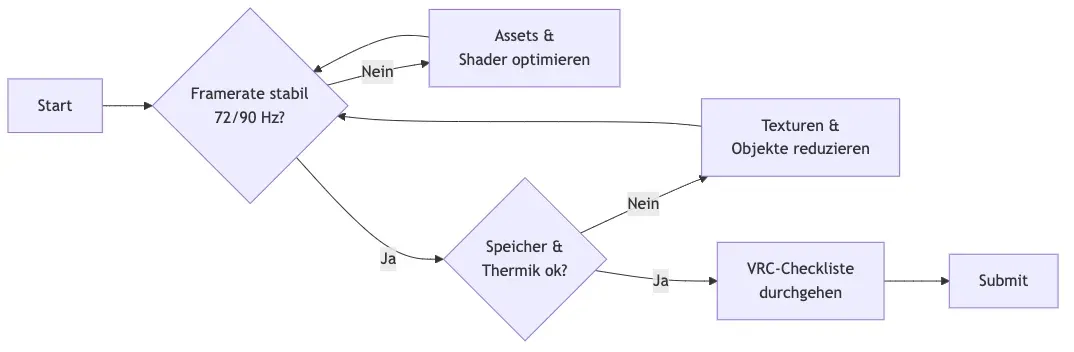
B{Framerate stable
72/90 Hz?}
B -->|No| C[Optimize assets &<br/>shaders]
C --> B
B -->|Yes| D{Memory &<br/>thermals ok?}
D -->|No| E[Reduce textures &<br/>objects]
E --> B
D -->|Yes| F[Run VRC<br/>checklist]
F --> G[Submit]
-->
The store reality: MVP first
While Assemble! was in production, Meta folded the App Lab into the Horizon Store — all existing titles supposedly landed directly in the shop. Wrong assumption: the guidelines were massively tightened, and the quick route into the store was history.
My recommendation: submit the first, simplest version (MVP) and test it with a selected group. The effort for documents, legal proofs and simply understanding the review team's feedback is consistently underestimated. In the end I literally asked WHAT EXACTLY was meant by the feedback — as an extra note in the ticket. That drastically reduced the wild interpretation work.
State of September 2026
The toolchain has moved on considerably since this post was first published:
- Godot 4.6 (stable since January 2026, currently 4.6.3) has entered its polish phase: performance optimization, tighter standard integration, fewer rough edges.
- XR Tools 4.5.1 (December 2025) — the current release, requires Godot 4.4+; improved pickables, grab points and Viewport2Din3D performance, among other things.
- OpenXR Vendors plugin 5.x — the version line for Godot 4.6; the 3.1.2 mentioned in the original text is outdated.
- Godot Meta Toolkit: a GDExtension with Platform SDK integration (IAP, achievements, leaderboards), the Meta XR Simulator for headset-free testing, and automatic export configuration for Quest.
- Hardware baseline: Quest 3S as the development reference; the Quest 2 is off the market (security updates until December 2027).
Pro tips for XR development with Godot
- Start with the official XR setup guide
- Adopt the documented Better XR Start Script as your base
- Profile early and often — on the device, not in the editor
- Use the Godot community — it's helpful in every project phase
Conclusion
With Meta's official support and the editor running on the headset, Godot is no longer a niche choice for XR. Assemble! proved it: the combination of Jolt physics, XR Tools and disciplined performance work carries a commercial Quest title all the way into the store. Anyone planning the same route will find the game's side of the story in the Assemble! post — and the biggest time sinks still lurk in shaders, polygon counts and store bureaucracy.
Update September 2026: This article has been revised — updated to Godot 4.6 / XR Tools 4.5.1 / Vendors 5.x, API errors corrected (Godot 4 monitor names, display_refresh_rate instead of iterations_per_second, MEMORY_STATIC instead of OS.get_static_memory_usage()), the OVR Metrics assessment corrected, and the Mermaid flowchart rendered as an image.
Sources
- Godot Editor — Horizon Store Early Access Release — Godot Engine (2024)
- Godot XR update — February 2025 — Godot Engine (2025)
- Godot XR Tools Releases — GodotVR, GitHub (2025)
- Godot OpenXR Vendors Releases — GodotVR, GitHub (2026)
- Godot Meta Toolkit — GitHub repository
- OVR Metrics Tool — Meta Horizon OS Developers
- VRC Requirements — Performance — Meta Horizon OS Developers
Bringing a Godot XR project toward the Quest store or stuck on performance optimization? Write to ingmar@konnow.de or reach out via LinkedIn — I've played this track all the way through.