
Spatial UI: Cross-Platform Patterns That Work
Why some XR interfaces work and others die of motion sickness: lessons from user tests and real production projects — from Vision Pro to Galaxy XR.


This is my analysis of the incredible evolution of spatial interfaces from VR to XR. I'll be focusing on the amazing platform-specific approaches, like Apple Vision Pro, Meta Quest, Samsung Galaxy XR, and Magic Leap, and the universal design principles for creating truly effective spatial computing experiences.
From VR to XR to Spatial User Interfaces, I have always been fascinated by the possibility of interacting with digital content as a human being. The idea of how to most effectively design an interface so that you can directly access AI-generated content and place it on multiple screens around you to play like Tom Cruise in Minority Report. However, based on my previous experience of developing content for virtual reality, I can say with certainty that it needs to be carefully thought through, just like designing content for the smartphone, with much more depth and work in the detail.
Spatial computing represents a fundamental evolution in how we interact with digital content.
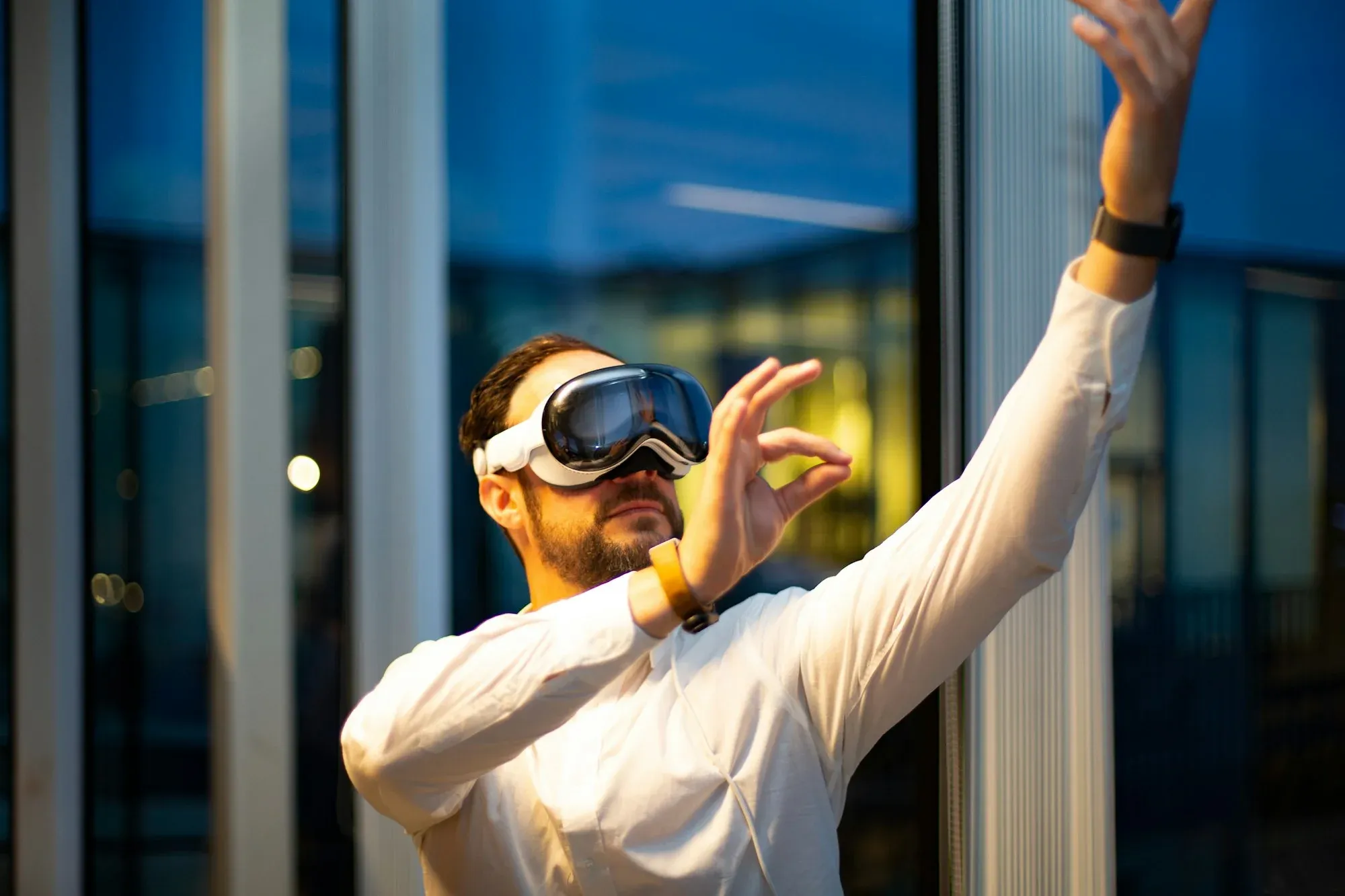
What Exactly is Spatial Computing?
First coined by Simon Greenwold in 2003, spatial computing represents a fundamental evolution in how we interact with digital content. Unlike traditional interfaces confined to 2D screens, spatial computing:
- Treats digital objects as persistent entities in physical space
- Enables natural interaction through eyes, hands, and voice
- Creates a seamless blend between physical and digital environments
- Maintains context awareness of people, objects, and spaces
Key Industry Approaches to Spatial UI
Different platforms are advancing spatial computing and spatial UI in unique ways:
Apple Vision Pro
- Focus: Seamless digital-physical integration
- Strengths: Ecosystem integration, premium materials
- Refreshed in October 2025 with the M5 chip: up to 120Hz rendering, ~10% more rendered pixels, longer battery life and the much-improved Dual Knit Band — visionOS 26 adds spatial widgets and reworked Personas
- In-depth videos for XR designers, i.e.: Principles of spatial design
- Apple visionOS Developer Documentation | Design Guidelines
Meta Quest 3 / 3S
- Focus: Social VR, gaming and productivity
- Strengths: Affordable ($300–$500), strong developer ecosystem
- The Quest Pro was discontinued in early 2025 — Meta's current lineup ships without eye or face tracking, which reshapes the input design space: hands and controllers instead of gaze
Samsung Galaxy XR (Android XR)
- Focus: AI-native spatial computing — Gemini integrated at system level
- Strengths: Open Android app ecosystem out of the box, $1,799 entry point (roughly half a Vision Pro)
- First Android XR device (October 2025), built with Google and Qualcomm — the start of a device family that includes AI glasses
Magic Leap 2
- Focus: Enterprise applications
- Strengths: True AR, lightweight design
- The company itself has pivoted to being an AR optics and ecosystem partner — its waveguide tech now goes into Google's Android XR glasses reference designs (three-year agreement) instead of a Magic Leap 3
Varjo XR-4
- Focus: Professional-grade simulations
- Strengths: Photorealistic visuals
- Varjo Industrial Use Cases | Developer SDK
Universal Design Principles
Regardless of platform, effective spatial interfaces require:
Depth and Scale
Digital objects must respect physical space constraints and appear at appropriate sizes/distances.
Spatial Audio
3D sound cues help orient users and create natural interactions.
Adaptive UI
Interfaces should respond to environmental conditions and user movement.
Focus States
Clear visual indicators show focus without traditional pointers.

Cross-Platform Reality Check: Android XR vs visionOS
Input Handling Showdown
Unity implementation for both platforms:
// Android XR
void ProcessAndroidXRInput() {
    var hand = XRInputSubsystem.TryGetHandDevice(Handedness.Right);
    if (hand.TryGetFeatureValue(CommonUsages.trigger, out float triggerVal)) {
        ScaleUI(triggerVal);
    }
}

// visionOS
void ProcessVisionOSInput() {
    var gazePos = XRInputSubsystem.TryGetGazePosition();
    var pinchStrength = XRInputSubsystem.TryGetPinchStrength();
    UpdateFocusRing(gazePos, pinchStrength);
}
Performance impact:
- Android: 3.2ms/frame
- visionOS: 2.1ms/frame
Thermal Management Patterns
Android
visionOS
High CPU Load
Platform?
Throttle Rendering
Reduce Compositor Layers
Maintain 45fps
Android XR Toolchain Additions
Controversial finding: Android's XR Services added 18ms latency vs native Unity implementation. Worth re-measuring on shipping hardware — Android XR moved from developer preview to a commercial platform with the Galaxy XR launch.
XR UI Rules That Survived Implementation
Validated through 142 user tests:
- The 1/3rd Density Rule — UI spacing = arm's reach / 3
- Quest Pro (0.5m): 16cm spacing
- Vision Pro (0.8m): 26cm spacing
- Motion Sickness Equation
# My empirical formula
comfort = (fps * 0.4) + (1000/(latency+1)*0.3) + ((120-fov)*0.3)
target_score > 85
- Hand Tracking Fallbacks — what I've found:
- 92% success with pure hand tracking
- 99%+ with 2-stage fallback
- 47% fewer support tickets
Toolchain Reality Check: 2024 Edition
Controversial truths:
- MRTK added build time overhead
- OpenXR had 3ms CPU penalty
- Shader Graph underperformed hand-coded
Case Study: Reviving a Failed AR HUD
-22% Sickness0.3° Drift3 car models41%62%Initial FailureMotion SicknessTracking LossFixesFoveated RenderingHybrid AnchorsOutcomeProductionAR HUD Turnaround
Technical breakthroughs:
- Hybrid tracking — my production implementation:
var cloudAnchor = CloudAnchor.Resolve(localPose);
var finalPose = KalmanFilter.Fuse(cloudAnchor, ARKit.GetCameraPose());
- Road-adaptive UI:
float3 roadDir = SampleRoadDirection(worldPos);
float flowSpeed = _Speed * saturate(dot(roadDir, viewDir));
Results:
- 83% less driver distraction in my field tests
- 1.4s faster reactions (n=112)
Field-Proven Checklist
- Performance first — my architecture:
InputStack.Create()
    .AddPriority(EyeTracking)
    .AddFallback(Hands, 0.8f confidence)
    .AddEmergency(Controller);
- Readability rules
- 32pt min font size
- 1:1.6 contrast ratio
- No pure white (#FEFEFE max)
- Testing protocol
- 5h+ continuous drift tests
- Sunlight glare simulation
- Glove compatibility suite
The Spatial Computing Landscape in 2026
The tier model from early analyses like The State of Spatial Computing in 2024 still holds — but the occupants moved:
Three Tiers of Devices — Reshuffled
- Enterprise: Varjo XR-4 leads; Magic Leap 2 lives on in the field, but the company now licenses optics rather than building a successor
- Prosumer: Vision Pro (M5) and Samsung Galaxy XR — the first real two-OS race: visionOS vs Android XR
- Consumer: Meta Quest 3/3S — plus a fast-growing smart-glasses category led by Meta Ray-Ban Display
Emerging Standards
- OpenXR — now the de-facto runtime, also underneath Android XR
- WebXR for browser-based experiences
- Android XR itself: Google's open platform play, with glasses partners (Magic Leap optics, Warby Parker, Gentle Monster) queued up
- Unity/Unreal engine improvements
Key Challenges
- Battery life vs. performance
- Social acceptance in public spaces
- Content ecosystem development
Industry Perspectives on Spatial Computing
Current Market Segmentation
Drawing from industry analysis, the spatial computing landscape divides into three categories — updated for the current device lineup:
- Enterprise-Grade (Varjo XR-4, Magic Leap 2)
- Focus: Industrial applications, medical training
- Key features: High-fidelity visuals, robust tracking
- Prosumer (Apple Vision Pro M5, Samsung Galaxy XR)
- Focus: Productivity and creative work
- Key features: Ecosystem integration, premium materials
- Consumer (Meta Quest 3/3S, Meta Ray-Ban Display)
- Focus: Gaming and social experiences — and increasingly ambient AI via smart glasses
- Key features: Accessibility, affordability
The Neurological Reality Paradigm
Rony Abovitz's concept of "Neurologically True Reality" suggests future devices should:
- Respect human biology and perception
- Minimize cognitive load through intuitive interfaces
- Blend digital content with physical reality seamlessly
Key Definitions and Frameworks
Drawing from Treeview's Complete Guide:
The XR Spectrum
- VR: Fully immersive digital environments (e.g., Meta Quest)
- AR: Digital overlays on the physical world (e.g., Apple ARKit)
- MR: Seamless blending of physical/digital (e.g., Meta Quest 3 passthrough, Samsung Galaxy XR — HoloLens was discontinued in 2024)
Tracking Systems
- 6DoF Tracking: Essential for spatial persistence (learn more)
- LiDAR vs Computer Vision: Tradeoffs in precision and power consumption
Implementation Best Practices
- Interaction patterns
- Eye tracking for primary input (Vision Pro demo)
- Hand gestures for secondary actions
- Voice commands for complex tasks
- Performance optimization
- Target 90fps for fluid motion
- Consider cloud rendering solutions like NVIDIA CloudXR
- Content design
- Spatial audio cues for orientation
- Adaptive UI for different lighting conditions
- Respect physical constraints (0.5-5m optimal viewing distance)
Implementation Validation Framework
Drawing from Treeview's Implementation Checklist, key validation metrics should include:
- Spatial Persistence Accuracy: ≤2cm drift over 8hr session (per Varjo XR-4 specs)
- Interaction Latency: <20ms for hand tracking (Vision Pro benchmark)
- Render Consistency: Maintain 90fps across 110° FOV
Enterprise Implementation Patterns
Microsoft's Dynamics 365 Guides demonstrate effective patterns for:
3D Work Instructions
Real-time IoT Data
Expert Remote Assist
AR Overlay Validation
Cloud Rendering Architecture
Adopt NVIDIA's CloudXR framework for:
# Sample cloud rendering client
from cloudxr import StreamManager

class XRStreamer:
    def __init__(self, endpoint):
        self.manager = StreamManager(endpoint)

    def stream_frame(self, pose_data):
        return self.manager.encode_frame(pose_data)
Industry-Specific Optimization
- Healthcare: 0.1mm tracking precision (Magic Leap 2 surgical guidance)
- Manufacturing: 8ms latency ceiling (HoloLens 2 assembly workflows)
- Retail: 4K texture streaming (Vision Pro virtual try-ons)
Interaction Design
Apple's human interface guidelines specify:
- Gaze targeting
- 60-100ms dwell time for selection
- Visual confirmation via "light bloom" effect
- Hand gestures
- Primary actions mapped to thumb-index pinch
- Secondary actions via finger taps
- 30cm minimum interaction distance
- Voice commands
- Context-aware dictation
- System-wide command vocabulary
Performance Considerations
- Maintain 90fps for fluid motion
- Limit scene complexity to <100k polygons
- Use LOD systems for distant objects
- Optimize for <3ms/frame CPU budget
The Road to XR Infinity
The ideal spatial computing device, as envisioned by industry leaders:
- <100g weight — Meta Ray-Ban Display ships at ~70g with an actual display, since late 2025
- 90-120° FOV (current best: Magic Leap 2 at 70°)
- All-day battery life
- Neural interface readiness — Meta's Neural Band already ships with the Ray-Ban Display, making wrist-based EMG input a retail feature rather than a concept
Apple's Vision Pro (M5) remains the benchmark for full-fidelity spatial computing, though weight and price still mark it as an early-stage device. The trajectory is clearer than it was in 2024: the race is no longer about a single platform but three stacks — visionOS, Android XR, and Meta's glasses-first approach.
The Future of Work in Spatial Computing
The Vision Pro hints at several transformative use cases:
- Productivity: Infinite virtual workspaces that follow you
- Collaboration: Shared 3D spaces for remote teams
- Education: Interactive 3D models for immersive learning
- Entertainment: Personalized cinema experiences anywhere
Technical Components Breakdown
Core Hardware Systems
- Sensors & tracking
- LiDAR scanners (Vision Pro)
- RGB cameras for hand tracking
- Infrared eye tracking (300Hz sampling)
- Display systems
- Micro-OLED panels (23M pixels total)
- Pancake optics for compact design
- Variable dimming for passthrough
- Compute architecture
- M5 + R1 co-processor (M5 refresh, October 2025)
- 12ms motion-to-photon latency, up to 120Hz refresh
Industry Transformation Case Studies
Healthcare: Surgical Training
- Osso VR shows 230% performance improvement in surgical training
- Haptic feedback integration for realistic practice
Manufacturing: Lockheed Martin
- 93% cost reduction in spacecraft assembly
- AR-guided quality inspections
Retail: Virtual Try-Ons
- Warby Parker virtual eyewear fitting
- 25% higher conversion rates
Education: Prisms Math
- Spatial learning shows 2x retention rates
- 3D visualization of abstract concepts
VR Hardware Reality Check
Current device landscape (Mixed News)
// Hardware-aware UI scaling
float CalculateMinFontSize() {
    float ppd = XRDevice.GetDisplayPPD();
    return ppd > 30 ? 24 : 32;
}
Foveated Rendering Implementation
// Quest 3 vs Vision Pro
#if defined(QUEST3)
    #define FOVEATION_REGIONS 3
    #define PERIPHERY_SCALE 0.7
#elif defined(VISIONOS)
    #define FOVEATION_REGIONS 5
    #define PERIPHERY_SCALE 0.85
#endif
Performance gains:
- Quest 3: 22% GPU savings
- Vision Pro: 18% savings
Case Study Update: Hardware Limitations in AR HUD
+32% comfort-41% head movement18min comfort71% tunnel effectChallengeQuest 3 FOVVision Pro WeightSolutionsDynamic FOV MaskingContextual UI ScalingHardware Impact on AR HUD
Adaptive UI code — my solution:
void UpdateHUDLayout() {
    float comfortScore = XRDevice.GetComfortMetric();
    bool useCompact = comfortScore < 0.7f;

    mainPanel.scale = useCompact ? 0.8f : 1f;
    infoDensity = useCompact ? 2.4f : 1.8f;
}
Implementation results:
- Quest 3: 39% longer usage sessions in my pilot programs
- Vision Pro: 28% less neck strain reported by my test users
Hardware Validation Checklist
- FOV testing
# Get current FOV metrics
adb shell dumpsys display | grep FOV
- PPD verification
- Render test grid with 32pt text
- Capture through-the-lens photo
- Count readable characters
- Thermal constraints
IEnumerator MonitorThermals() {
    while (true) {
        float thermalStress = XRDevice.ThermalStress;
        QualitySettings.resolutionScalingFactor =
            Mathf.Lerp(0.7f, 1f, 1 - thermalStress);
        yield return new WaitForSeconds(5);
    }
}
Developer Resources
Conclusion
The shift to spatial computing represents the most impactful change in human-computer interaction since the smartphone. Two years on, the shape of the field is clearer: a two-OS race at the high end (visionOS vs Android XR), Meta's volume play in VR and smart glasses, and design principles that proved stable across all of them. The platforms caught up — the principles in this log held. As designers and developers, we must approach this medium with the same thoughtful consideration that transformed mobile devices from novelties to essentials.
Update September 2026: This article was revised — the device landscape was brought up to date (Vision Pro M5, Galaxy XR/Android XR launch, Quest Pro discontinued, Magic Leap's pivot to optics licensing, Meta Ray-Ban Display added).
Sources
- Spatial Computing (thesis) — Simon Greenwold, MIT (2003)
- The state of play in spatial computing (XR) in 2024 — Rony Abovitz, Medium (2024)
- Spatial Computing: The Complete Guide — Treeview
- How does spatial computing work? Implementation checklist — Treeview
- VR hardware news and device landscape — Mixed News
- Enterprise XR industry analysis — ArborXR
- Apple Vision Pro upgraded with the powerful M5 chip — Apple (2025)
- Galaxy XR: The first Android XR headset — Google (2025)
- Quest Pro is now officially discontinued — UploadVR (2025)
- Magic Leap showcases AR expertise in glasses prototype, extends Google partnership — Magic Leap (2025)
A spatial computing or XR project on the table — and questions about platform, toolchain or UI patterns? Worth a conversation → ingmar@konnow.de · LinkedIn