
XR Experience Design - UX with hands
Pinch instead of controllers: when hand tracking actually makes sense in XR — and where it fails on precision, habits and plain old grabbing.

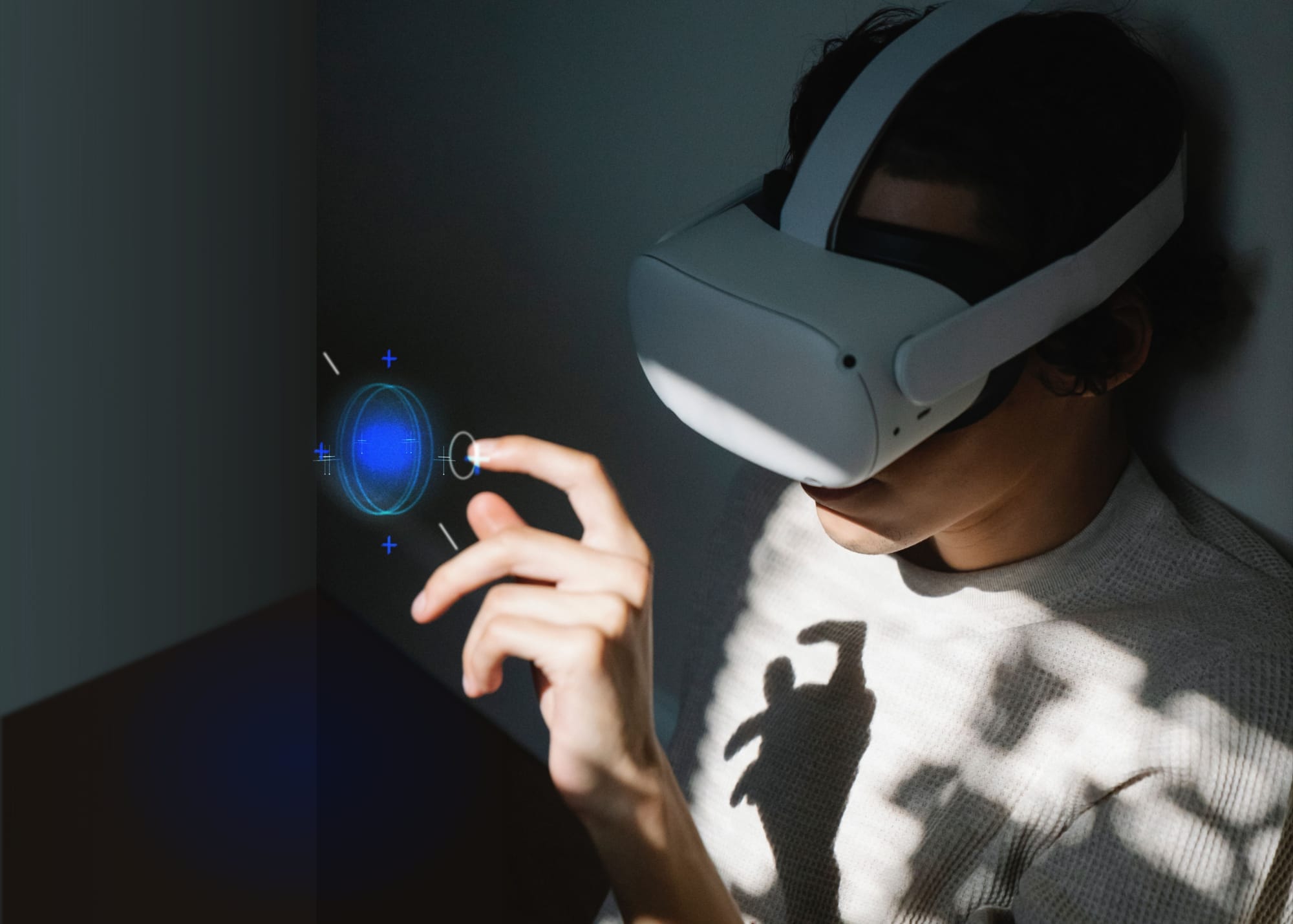
VR and XR headsets like Meta Quest 3 and 3S, Apple Vision Pro, Samsung Galaxy XR or Pico 4 Ultra ship with hand tracking as a standard interaction — an alternative to controllers or, on Vision Pro and Galaxy XR, the primary input model. For mixed-reality applications especially, where passthrough shows the actual surroundings, the most natural interaction possible just makes sense.
Collected here are the information and links that helped me during the production of a serious game for a client — hand tracking was the default interaction for operating and navigating the GUI. Various gestures let the player move freely despite a seated position.
XR control concept with an IR sensor
Hand-based XR interaction had its first big surge in the mid-2010s — largely thanks to the Leap Motion Controller, a compact infrared tracker that attaches to the VR headset via USB. That made it relatively easy to feed the IR data into a rig in Unity or Unreal, matched to a 3D model. With this add-on, users navigate virtual and mixed reality with their hands instead of a controller. In 2019, Leap Motion became Ultraleap, and its tracking shipped natively in headsets like Varjo's. The company's fate tells the market story alongside: once headset-native camera recognition made dedicated trackers obsolete, Ultraleap was broken up in 2025 — the hand-tracking division went to music-technology company ROLI, the patent portfolio to SIM IP. For XR projects the takeaway is plain: dedicated hand-tracking hardware is history — the headsets' native recognition is what you build on.
Interaction with the fourth dimension
Sounds crazy at first, but it's been real for a while — just not particularly effective or stable yet. The intuitive interface control Tom Cruise demonstrated in Minority Report is still nowhere near reached. Both software and hardware simply lacked availability, and the corresponding awareness had to develop first: only the frequent, cross-application establishment of gestures creates a feel for the control scheme.
Every smartphone user knows that swiping top to bottom refreshes the app — usually provided the scroll position is at the top. That NUI gesture has entered common knowledge. Same for the scroll gesture (swiping left and right) and operating the so-called drawer for general menus: pull down from the top edge, on Apple devices additionally up from the bottom to quickly reach buttons like mute, airplane mode or Wi-Fi.
On VR, AR and XR devices there are hardly any standard gestures — except the pinch gesture (bringing thumb and index finger together), established by HoloLens. Native hand tracking integration arrived late: Meta shipped the first version on Quest in late 2019. The update known as Hand Tracking 2.0 (2022) uses the headset cameras — the same ones that serve environment tracking — and proves very effective. Meta has since arrived at Hands 2.4 — including Fast Motion Mode, which reliably captures high-speed interactions like punches and throws. More on that, especially from a technical angle, in the talk by Robert Wang (Director of Research Science @Meta) — only the first 13 minutes are relevant.
The presentation helps understand the AI-boosted hand-recognition process.
Operating interfaces with your hands
From a UX/UI perspective, hand tracking belongs to the Natural User Interface (NUI) category — the "natural" way of operating interfaces. Although hand tracking has been possible since about 2015, hand-operated applications in VR and XR saw little use for a long time — partly due to the poor precision of earlier implementations, partly due to a lack of use cases. I've written more about which interface patterns carry across platforms in the Spatial UI post.
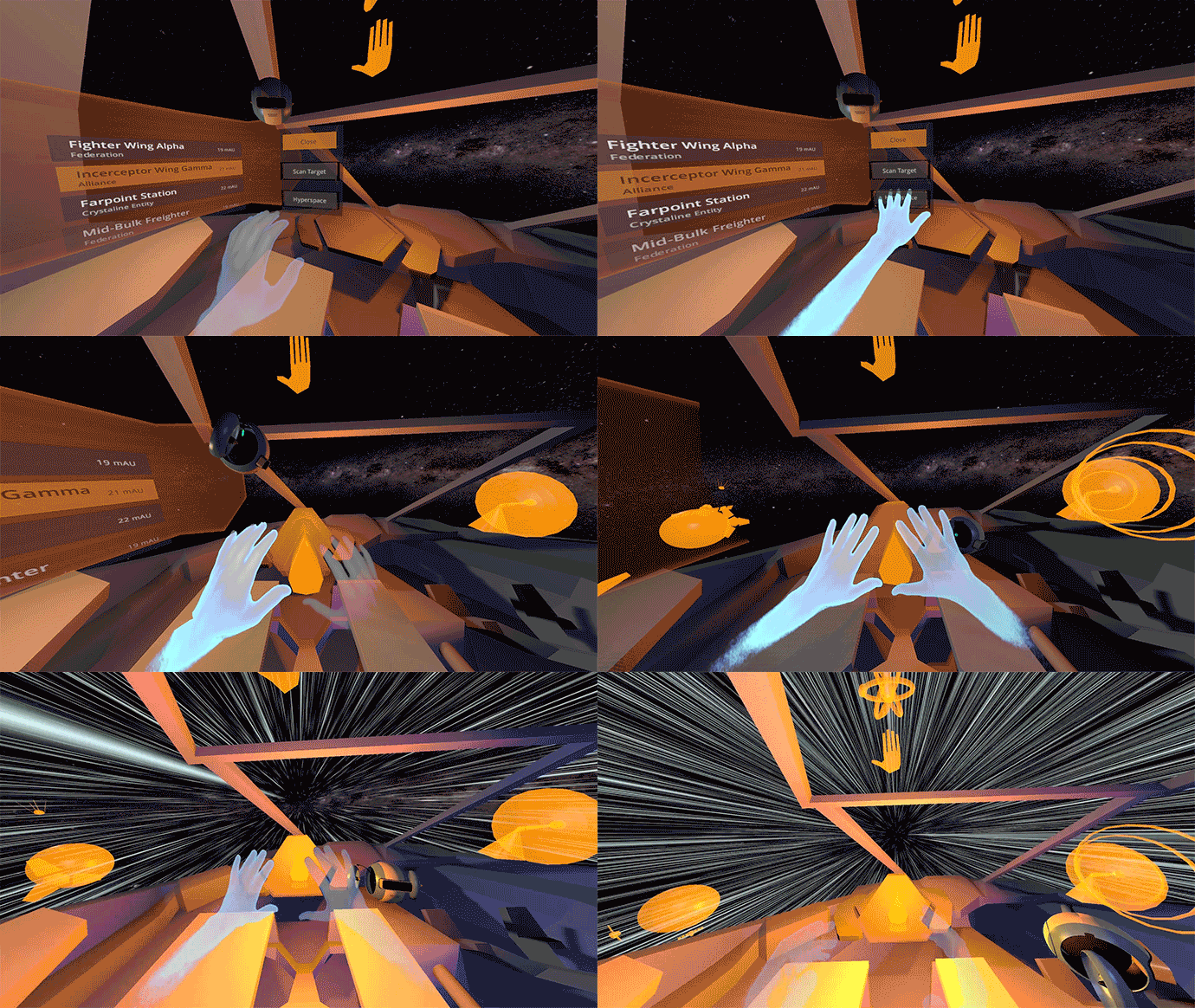
Leap Motion's design rules from 2015 — still valid at their core:
- The "physical" design of interactive elements in VR should offer distinctive affordances.
- Every interactive object should respond to every movement.
- Required gestures should be clearly described through text-based hints.
- Interactive elements should be scaled appropriately.
- Text and images belong on slightly curved, concave surfaces.
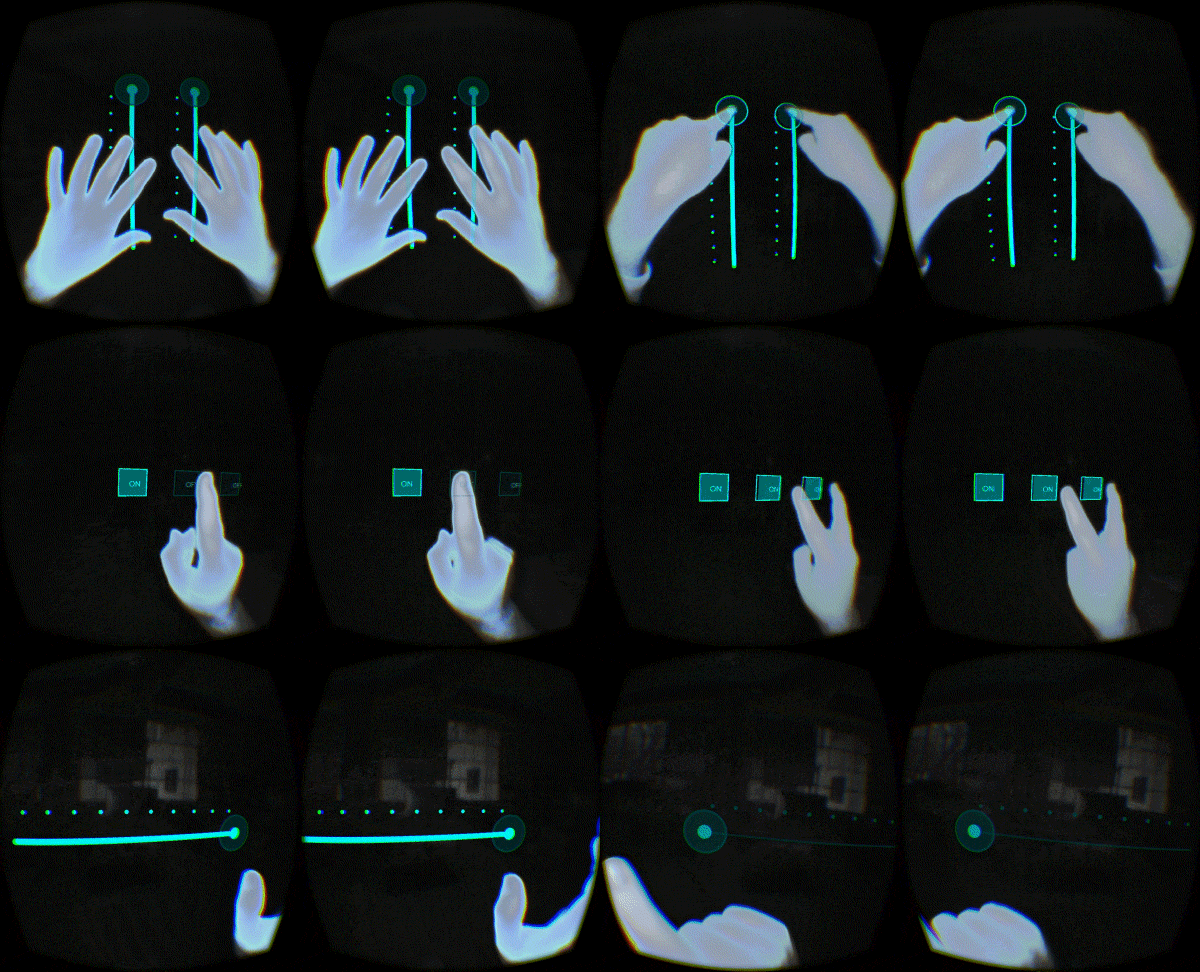
- VR Design Best Practices — LeapMotion on Medium (2015)
No interface is the best interface — and interaction with the hands always feels more natural. Because implementing hand-operated applications wants careful planning, a pro-and-con evaluation is in order.
Pro: when does hand tracking make sense?
For short interactions and productivity applications, hand tracking is ideal. This form of interaction can also be effective and uncomplicated in games, fitness applications, and marketing or trade-show installations.
The "okay, do hand tracking" list
- Reduced hardware complexity (no additional controllers)
- Objects interacted with only "briefly"
- Gears, cranks, knobs and switches
- Gestures and "power moves" (global effects)
- Triggering animations
Contra: when does hand tracking not make sense?
As soon as virtual objects need to be grabbed and held for longer, the more precise controllers are the better choice — unless a haptic-feedback glove is available.
The "don't do hand tracking" list
- Held firearms
- Pistols
- Rifles
- Held blades and melee weapons
- Sword
- Axe
- Spear
- Climbing and gripped climbing
- Precise drawing and modeling
Gloves for haptic / perceptible grabbing
There has to be a solution for longer-lasting grabbing, right? There is. Anyone who paid close attention to Minority Report noticed: Tom Cruise wears gloves for the interaction. Several haptic gloves are already on the market — with exoskeletons or, more compact, with constructions around a glove that combine interaction with haptic feedback.
When something is grabbed in the virtual world, it feels real because the glove simulates resistance.
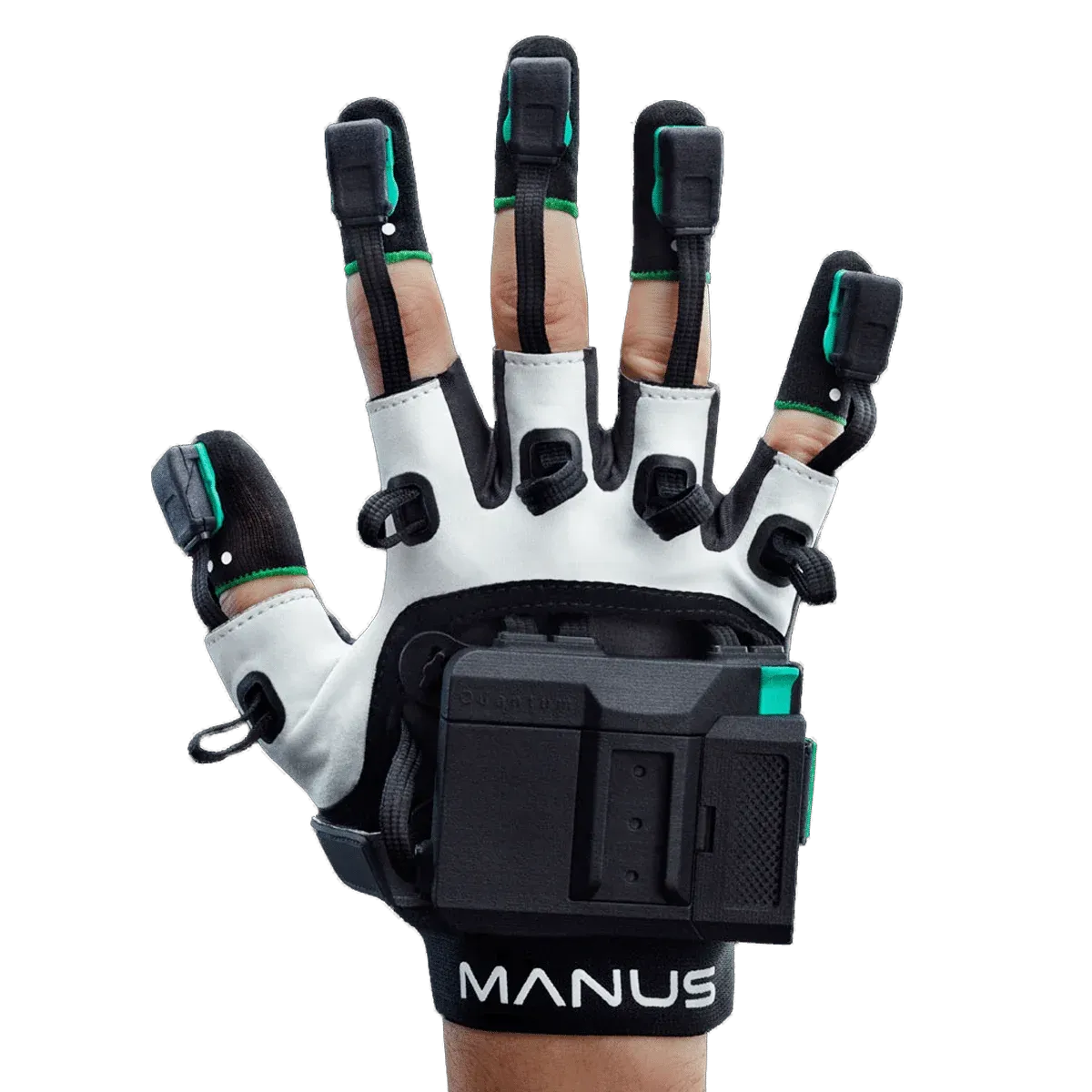
Manus' Quantum Metagloves last sold for around $6,000 and enabled high-precision finger tracking via absolute fingertip positioning. The line has since reached end-of-life — successors like the Metagloves Pro play in the same league.
As the Minority Report reference already outlined: haptic gloves allow finger and hand movements to be captured very precisely and in real time. Modeling, drawing or even operating complex robotic systems and machinery become entirely feasible — medical applications benefit too. But with prices in the four-digit range, these gadgets remain too expensive for the consumer market.
XR experiences with hand tracking
Meta's First Hand demo shows the effectiveness of Hand Tracking 2.0.
Official hand tracking demo built with the Presence Platform Interaction SDK.
Controlling VR with gestures instead of controller buttons remains fairly experimental — as described, that's down to user expectations and the availability of supporting devices. A learning curve should be anticipated and planned for from the start.
There's only a limited number of gestures users can memorize. When developing motion controls, establishing a common base makes sense — or trying to combine gestures for extended functions.
An even better approach is designing specific cues (like a depiction of a gesture) that users respond to — so a particular pose or movement doesn't have to be learned from scratch.
Because people physically express body language in different ways, gestures rarely work the same for everyone: one person hyperextends their hand when grabbing, another turns their wrist slightly inward.
Through testing, comparing and observing, I've found the best approach is capturing the user's own gestures: show the gesture, have it repeated, then calibrate.
The future of hand tracking & gesture control
Steadily improving tracking precision can increasingly be used to establish gestures. Mixed-reality use cases are ideal — and it doesn't depend on headsets alone: research already demonstrates effective gesture control with smartphones. In direct comparison with the HoloLens 2, smartphone-based HGR (hand gesture recognition) proved equally effective.
The VR action roguelite Ghost Signal: A Stellaris Game shipped in early 2023 with Hand Tracking 2.0 support.
AI-boosted recognition has made native hand tracking a standard — by now the Vision Pro drives its entire interface via gaze plus pinch. If more virtual content like Ghost Signal actually gets designed for hand tracking, little stands in the way of the next evolutionary stage of operable interfaces.
The increasing availability of eye tracking will also play a significant role — not just for interaction, but for effective UX testing without pulling the user out of the experience.
Still, the road from the current state to truly comfortable controls à la mouse and keyboard is long. One thing can be said with certainty: nobody will sit in a completely empty room in the future, and office furniture will largely stay as it is. A comfortable seated position and support remain essential for staying productive over longer periods.
Update September 2026: This article was editorially revised — the device list brought up to date (incl. Vision Pro), the Leap Motion/Ultraleap history corrected, Quantum Metagloves status (end-of-life) updated, dead links and broken lists fixed, and a generic "future" paragraph removed.
Sources
- How does the Leap Motion Controller work? — LeapMotion, Medium
- VR Design Best Practices — LeapMotion, Medium (2015)
- What do VR interfaces and teapots have in common? — LeapMotion, Medium (2015)
- SHREC 2021: Skeleton-based hand gesture recognition in the wild — Computers & Graphics (2021)
- Tesla-Rapture: A Lightweight Gesture Recognition System from mmWave Radar Sparse Point Clouds — IEEE Transactions on Mobile Computing (2022)
- Hand Gesture Recognition for Smartphone-Based Augmented Reality Applications — ResearchGate (2020)
- Hand Tracking Deep Dive: Technology, Design, and Experiences — Robert Wang, Meta / YouTube
- First Hand — Meta Quest (demo app)
- Ghost Signal: A Stellaris Game — Fast Travel Games (2023)
- Quantum Metagloves — Manus · HaptX — haptic gloves
- Handz — ThreeDee (CC0 gesture models)
Questions about hand tracking, gesture control or an XR project of your own? Write to ingmar@konnow.de or reach out via LinkedIn.Because people physically express body language in different ways, gestures rarely work the same for everyone: one person hyperextends their hand when grabbing, another turns their wrist slightly inward.
Through testing, comparing and observing, I've found the best approach is capturing the user's own gestures: show the gesture, have it repeated, then calibrate. Calibrated that way, the interactions ran noticeably more stable in test sessions than with generic poses.
The future of hand tracking & gesture control
Steadily improving tracking precision can increasingly be used to establish gestures. Mixed-reality use cases are ideal — and it doesn't depend on headsets alone: research already demonstrates effective gesture control with smartphones. In direct comparison with the HoloLens 2, smartphone-based HGR (hand gesture recognition) proved equally effective.
The VR action roguelite Ghost Signal: A Stellaris Game shipped in early 2023 with Hand Tracking 2.0 support.
AI-boosted recognition has made native hand tracking a standard — by now the Vision Pro drives its entire interface via gaze plus pinch. If more virtual content like Ghost Signal actually gets designed for hand tracking, little stands in the way of the next evolutionary stage of operable interfaces.
The increasing availability of eye tracking will also play a significant role — not just for interaction, but for effective UX testing without pulling the user out of the experience.
Still, the road from the current state to truly comfortable controls à la mouse and keyboard is long. One thing can be said with certainty: nobody will sit in a completely empty room in the future, and office furniture will largely stay as it is. A comfortable seated position and support remain essential for staying productive over longer periods.
Looking back at that production, the direction has held up: hand tracking went from experiment to standard interaction — and Vision Pro and Galaxy XR alike show where the input model is heading with gaze plus pinch. The design questions remain: gestures must be learnable, their number limited, and calibration beats generic poses. What fell away is the hardware barrier — that's where the actual UX work begins.
Sources
- How does the Leap Motion Controller work? — LeapMotion, Medium
- VR Design Best Practices — LeapMotion, Medium (2015)
- What do VR interfaces and teapots have in common? — LeapMotion, Medium (2015)
- SHREC 2021: Skeleton-based hand gesture recognition in the wild — Computers & Graphics (2021)
- Tesla-Rapture: A Lightweight Gesture Recognition System from mmWave Radar Sparse Point Clouds — IEEE Transactions on Mobile Computing (2022)
- Hand Gesture Recognition for Smartphone-Based Augmented Reality Applications — ResearchGate (2020)
- Hand Tracking Deep Dive: Technology, Design, and Experiences — Robert Wang, Meta / YouTube
- First Hand — Meta Quest (demo app)
- Ghost Signal: A Stellaris Game — Fast Travel Games (2023)
- Quantum Metagloves — Manus · HaptX — haptic gloves
- Handz — ThreeDee (CC0 gesture models)
- Ultraleap is joining ROLI — ROLI (2025)
- What's New with Hand Tracking in v83 — Meta Horizon OS Developers
An XR project on the table — hand tracking, gesture control or an interface of your own? Worth a conversation → ingmar@konnow.de · LinkedIn